If you've recently migrated a project from PyQt5 to PyQt6, you might have run into an error like this when trying to display SVG images:
qt.svg: <input>:1:7114: Could not parse node: radialGradient
qt.svg: <input>:1:31331: Could not resolve property: #check_gradient
Everything was working perfectly in PyQt5, and now your SVG radial gradients have vanished. The SVG renders, but any element using a radialGradient is simply missing. What's going on?
This issue was originally reported by a developer working with the python-chess library, which generates SVG chessboards. When a king is in check, the board draws a radial gradient highlight around the king's square. After switching to PyQt6, that highlight disappeared, replaced by the error above.
Let's look at what's happening and how to fix it.
Reproducing the problem
To see the issue clearly, here's a minimal SVG file (gradient.svg) containing a radial gradient:
<svg width="400" height="150">
 <defs>
    <radialGradient id="grad1"><stop offset="0%" stop-color="#ff0000" stop-opacity="1.0" /><stop offset="50%" stop-color="#e70000" stop-opacity="1.0" /><stop offset="100%" stop-color="#9e0000" stop-opacity="0.0" /></radialGradient>
 </defs>
 <ellipse fill="url(#grad1)" cx="200" cy="70" rx="85" ry="55"/>
 <text x="150" y="86" fill="green" font-family="Verdana" font-size="45">SVG</text>
</svg>
And here's a small PyQt5 test program to display it:
import sys

from PyQt5.QtWidgets import QApplication, QMainWindow, QGraphicsScene, QGraphicsView
from PyQt5.QtSvg import QGraphicsSvgItem

class MainWindow(QMainWindow):

    def __init__(self):
        super().__init__()

        self.scene = QGraphicsScene()

        self.viewer = QGraphicsView()
        self.setCentralWidget(self.viewer)

        svg = QGraphicsSvgItem('gradient.svg')
        self.scene.addItem(svg)

        self.viewer.setScene(self.scene)


app = QApplication(sys.argv)
w = MainWindow()
w.show()
app.exec_()
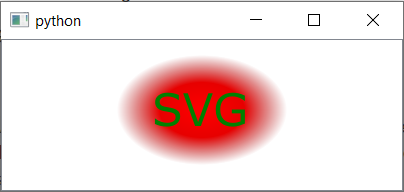
In PyQt5, this renders exactly as you'd expect — a red radial gradient filling the ellipse:
Now, the same code adapted for PyQt6 (with the import changed to from PyQt6.QtSvgWidgets import QGraphicsSvgItem and app.exec() instead of app.exec_()):
import sys

from PyQt6.QtWidgets import QApplication, QMainWindow, QGraphicsScene, QGraphicsView
from PyQt6.QtSvgWidgets import QGraphicsSvgItem

class MainWindow(QMainWindow):

    def __init__(self):
        super().__init__()

        self.scene = QGraphicsScene()

        self.viewer = QGraphicsView()
        self.setCentralWidget(self.viewer)

        svg = QGraphicsSvgItem('gradient.svg')
        self.scene.addItem(svg)

        self.viewer.setScene(self.scene)


app = QApplication(sys.argv)
w = MainWindow()
w.show()
app.exec()
Run this, and the gradient is gone. You'll see the "SVG" text and the ellipse outline, but the radial gradient fill is missing entirely, along with that Could not parse node: radialGradient error in the console.
Interestingly, swapping the radial gradient for a linear one works just fine in PyQt6:

Purchasing Power Parity
Developers in [[ country ]] get [[ discount.discount_pc ]]% OFF on all books & courses with code [[ discount.coupon_code ]]<svg width="400" height="150">
<defs>
<linearGradient id="grad1" y1="0%" x1="0%" y2="0%" x2="100%">
<stop offset="0%" style="stop-color:rgb(255,255,0);stop-opacity:1"/>
<stop offset="100%" style="stop-color:rgb(255,0,0);stop-opacity:1"/>
</linearGradient>
</defs>
<ellipse fill="url(#grad1)" cx="200" cy="70" rx="85" ry="55"/>
<text x="150" y="86" fill="green" font-family="Verdana" font-size="45">SVG</text>
</svg>
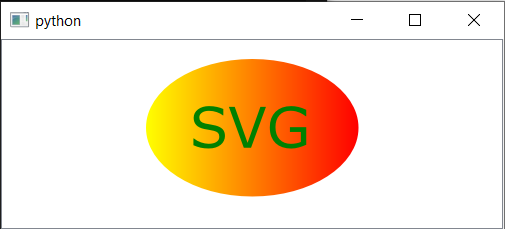
So the problem is specific to radialGradient elements. What's different about them?
The fix: add the r attribute to radialGradient
After comparing working and broken radial gradient examples, the culprit turned out to be a missing r (radius) attribute on the <radialGradient> element.
In the SVG specification, the r attribute on a <radialGradient> defaults to 50% if it isn't specified. PyQt5's SVG parser respected that default. PyQt6's parser is stricter — it requires the r attribute to be explicitly present, and if it's missing, the entire radialGradient node fails to parse.
The fix is to add r="0.5" to your <radialGradient> element:
<radialGradient id="grad1" r="0.5">
  <stop offset="0%" stop-color="#ff0000" stop-opacity="1.0"/>
  <stop offset="50%" stop-color="#e70000" stop-opacity="1.0"/>
  <stop offset="100%" stop-color="#9e0000" stop-opacity="0.0"/>
</radialGradient>
The value 0.5 is equivalent to 50%, matching the SVG spec's default. A radial gradient describes a circle that the color transitions radiate from, so it makes sense that a radius is needed — PyQt6 just insists you say so explicitly.
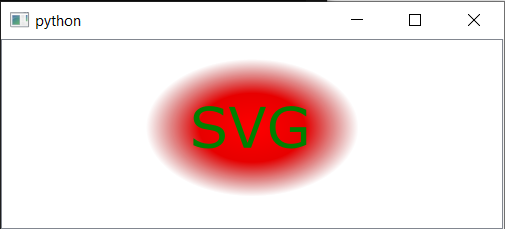
With that one attribute added, the gradient renders correctly again:
Complete working SVG with radialGradient for PyQt6
Here's the full corrected SVG file for reference:
<svg width="400" height="150">
 <defs>
  <radialGradient id="grad1" r="0.5">
    <stop offset="0%" stop-color="#ff0000" stop-opacity="1.0"/>
    <stop offset="50%" stop-color="#e70000" stop-opacity="1.0"/>
    <stop offset="100%" stop-color="#9e0000" stop-opacity="0.0"/>
   </radialGradient>
 </defs>
 <ellipse fill="url(#grad1)" cx="200" cy="70" rx="85" ry="55"/>
 <text x="150" y="86" fill="green" font-family="Verdana" font-size="45">SVG</text>
</svg>
What if the SVG is generated by a library?
If you're not writing the SVG by hand — for example, if it's generated by a library like python-chess — you'll need to either:
- Update the library to include the
rattribute. In the case of python-chess, this bug was reported and fixed upstream. Check if a newer version of your library already includes the fix. - Post-process the SVG before rendering it. You could do a simple string replacement on the SVG content to inject the missing attribute:
svg_string = svg_string.replace("<radialGradient", '<radialGradient r="0.5"')
This is a quick workaround, but updating the library is the better long-term solution.
Summary
If you encounter the error Could not parse node: radialGradient or Could not resolve property when rendering SVGs with QSvgRenderer, QSvgWidget, or QGraphicsSvgItem in PyQt6, the fix is straightforward: add the r="0.5" attribute to every <radialGradient> element in your SVG.
This attribute was optional in PyQt5 (defaulting to 50% per the SVG spec) but is required by PyQt6's stricter SVG parser. The value 0.5 (equivalent to 50%) preserves the standard default behavior, so your gradients will look exactly as they did before.
PyQt6 Crash Course by Martin Fitzpatrick — The important parts of PyQt6 in bite-size chunks
