This custom PyQt5/PySide2-compatible widget provides a graphic equalizer frequency visualizer for audio applications built with Python. It is completely configurable — from the number of bars, the number of segments, and colors to the animated decay effect. It's ready to drop into your Python Qt applications.
The download package includes a demo animation using random data and some custom color configuration so you can explore how the equalizer widget works.
Basic setup
To create an EqualizerBar object, pass in the number of bars and the number of segments per bar.
equalizer = Equalizer(5, 10)
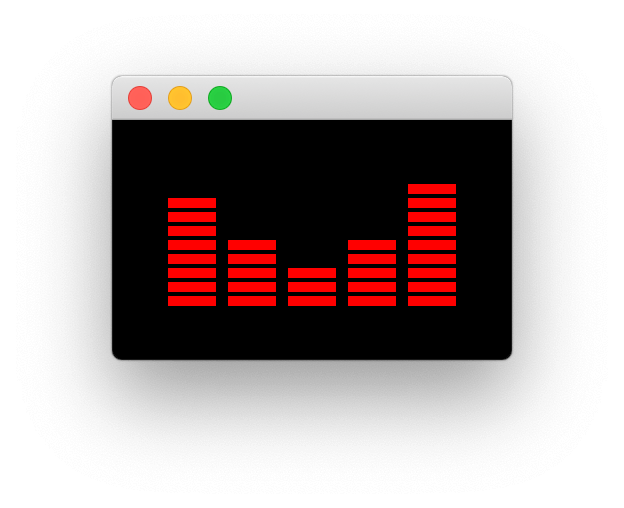 The default appearance of the equalizer bar widget.
The default range for each of the equalizer bars is 0...100. This can be adjusted using .setRange.
equalizer.setRange(0, 1000)
Configuring the decay animation
The equalizer bar includes a decay animation where peaks of values slowly fade over time. This is created by gradually subtracting a set value from the current value of each bar, using a recurring timer. If you're interested in other types of animations in Qt, see the tutorial on animated widgets and QPropertyAnimation.
The frequency of the decay timer (in milliseconds) can be configured using .setDecayFrequencyMs. The default value is 100ms.
equalizer.setDecayFrequencyMs()
Passing 0 will disable the decay mechanism.
On each tick a set value is removed from the current value of each bar. This is configured by using .setDecay. Adjust this based on your equalizer's range of possible values.
Purchasing Power Parity
Developers in [[ country ]] get [[ discount.discount_pc ]]% OFF on all books & courses with code [[ discount.coupon_code ]]equalizer.setDecay(0, 1000)
Customizing bar style and colors
The number of bars to display and the number of segments in the bars/the colors of those bars are defined at startup.
equalizer = EqualizerBar(10, ["#2d004b", "#542788", "#8073ac", "#b2abd2", "#d8daeb", "#f7f7f7", "#fee0b6", "#fdb863", "#e08214", "#b35806", "#7f3b08"])
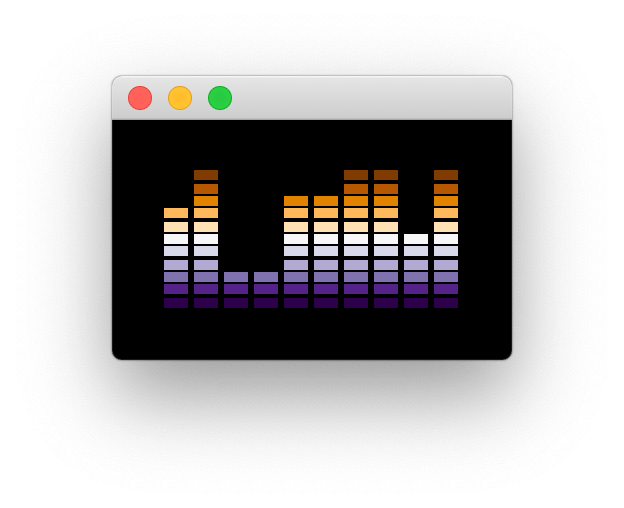 Purple Orange theme with 10 bars
To set the colors after startup, either provide a list of colors (QColor or hex values) at startup, or use the .setColors method. Passing a list of colors to this method will change the number of segments to match the colors provided.
equalizer.setColors(["#810f7c", "#8856a7", "#8c96c6", "#b3cde3", "#edf8fb"])
You can also use .setColor to set a single color for all segments, without changing the number of bars.
equalizer.setColor('red')
Adjusting bar padding and segment sizing
The spacing around the equalizer graphic is configured with .setBarPadding providing an integer value to add in pixels.
equalizer.setBarPadding(20)
The proportion of each segment in the bar which is solid/empty is configured using .setBarSolidXPercent or .setBarSolidYPercent with a float value between 0...1.
This can be used to make bar segments thinner and narrower if you prefer.
equalizer.setBarSolidXPercent(0.4)
equalizer.setBarSolidYPercent(0.4)
Finally, the background color can be configured using .setBackgroundColor.
equalizer.setBackgroundColor('#0D1F2D')
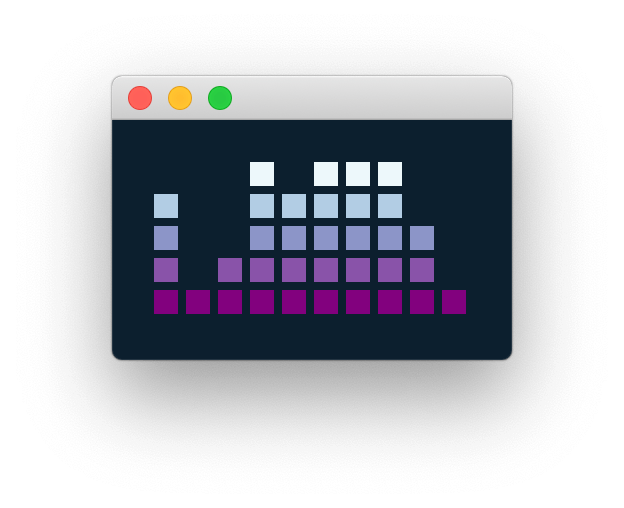 Customizing bar padding and sizing.
If you want to learn more about building your own custom widgets in PyQt5 or PySide2, take a look at the creating your own custom widgets tutorial. You might also be interested in other custom widgets like the Gradient widget or the Palette widget.
Create GUI Applications with Python & Qt6 by Martin Fitzpatrick — (PySide6 Edition) The hands-on guide to making apps with Python — Save time and build better with this book. Over 15K copies sold.
